

☀️ Updates are in for August! We're approaching a super-busy season across NICA. Thanks in advance for all of your help with all of the league/NICA events happening over the next few months!
Remember that this content is also found in the RUNNING UPDATES document sent to league directors each month.
OFFICE HOURS
NO OFFICE HOURS ON SEPT. 3; resuming Sept. 17
We are taking a short break to ensure we have availability during one of the busier weeks of the year to support Spring league and Regional Registration opening up. We’ll resume on Sept. 17. with a discussion about AI and brand/marketing/communications→ View our running agenda and past meeting recordings/discussions
→ Add Office Hours to your calendar
AI & THE NICA BRAND
Brand/marketing/comms-specific guidance for AI use
Last month, Sam shared our broader organizational AI guidance. The NICA MarCom team has also created more detailed guidance and use-cases for AI when it comes to brand, marketing, and communications. Please review our guidance and come with questions to our September 17 office hours to discuss. This is important information and should be shared with anyone who supports your league in the MarCom space (social media folks, designers, vendors/contractors doing brand/marketing work on behalf of your league, etc.)
→ Review our “AI Tools & the NICA Brand” guidance document
REGIONALS
IT’S GO TIME!
Registration is open and there will be a steady stream of email communications coming from the NICA National team regarding Regionals logistics. Please tune into our content calendar and Regionals dashboard to see what’s coming for your league.
📣 What should leagues do to help spread the word?
- 🙌 Please continue to promote Regionals in your own league newsletters, emails, and social media!
- See this example from Texas
- Share about the events during your race weekend announcements, coach meetings, and more
- Repost and share NICA’s existing social media about the events - i.e. our Sept. 1 “reg is open!” post
👀 What you’ll see over the next month
- Ongoing updates to the event guides, websites, and embeds for all league sites
- More sponsors showing up as final event contracts are signed
- Changing pop-ups on the event websites
HUBSPOT
NEW! Super-basic email template available
We created a super-basic email template for those times where you need to send just a quick block of text, and nothing more. Find the template by searching for “Super basic” in HubSpot templates.
→ Step-by-step video: How to find/use NICA’s new “Super-basic” email template for leagues
NOTE: Currently we have one template that all leagues can adapt; remember that custom sections allow you to change the email content quickly/easily to your league’s branding, colors, sponsors, and links. Once you’ve made a version for your league, simply clone it for future emails.
Cloning vs. using email templates - updated guidance for leagues
When to clone an email
We previously suggested leagues start every new email from a template. We're updating that guidance. Here's why, and when, you should clone emails in HubSpot Marketing instead.
Cloning is a great option when you're creating emails with similar content or structure. Many leagues send a series of similar emails (Texas coaches news, Idaho GRiT updates, etc.), anything with a repeating structure, audience, or cadence.
Our recommendation: create a baseline version of your "typical" email, then clone from there.
- Start with a template the first time, and format the email to fit your content.
- For the next email in the series, clone your previous email instead of starting from a template. Cloning preserves your send list, email settings, campaign settings, and formatting, so your series stays consistent and you skip re-setting everything up.
Common pitfalls
Cloning saves time, but it isn't risk-free. Watch for these issues:
- Formatting drift – Clone the same email too many times and formatting can break down: messed-up modules, odd spacing or padding, ghost sections. If a cloned email starts looking wonky, it's time to start fresh from a template.
- Naming – Always give your email a clear internal name. Never leave it as "New Email," or worse, "New Email (clone) (clone)" 😉Naming your emails consistently helps keep reports and future edits organized, and makes it much easier to identify the correct email and its web version for future sharing.
- Folder location – Cloned emails land wherever the original lived. Check that yours is in the right folder, and move it if needed.
- URL settings – Cloned emails inherit the original's URL. Update it before publishing: duplicate URLs cause problems and may result in your URL being inaccessible for anyone trying to view your email outside of their email client..
⚠️Even though cloning helps preserve features of your emails, don’t skip using the email builder checklist before every send. Some settings don’t translate in clones, and some are EXTRA-important to change if you make a clone! The checklist ensures that you don’t miss anything.
NEW FOR SPRING LEAGUES: Previous season segments
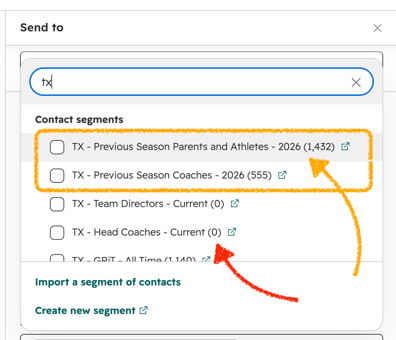 Pit Zone was reset in late August so this means that your current season segments are reset to zero as well, and will update as new registrations come into Pit Zone. We’ve created additional segments that capture last year’s participants/coaches, so you can still email these folks.
When selecting your audience for your upcoming communications, please be sure to select the [League] - Previous season [audience] lists to capture anyone who participated last season but may not have registered yet for the upcoming year.
SEE SCREENSHOT AT RIGHT: Previous season segments vs. current segments for spring leagues in HubSpot
NEW FOR SPRING LEAGUES: Email welcome series
As you know, spring league registration opened in Pit Zone on Sept. 1 (for both coaches and athletes).
NICA is supporting leagues with automated welcome emails in HubSpot for all riders, parents, and coaches who register for the upcoming season. The goal is simple: give a warm greeting from the league after folks register and have a “PAID” status in Pit Zone.
How it works:
When a coach, rider, or parent/guardian completes 2027 registration and reaches PAID status in Pit Zone, that data flows into HubSpot (every morning) and places them on your league's current season segment based on their role (coaches, parent, or rider).
We've set up a workflow (previously called a "journey" in Iterable) so that a welcome email is sent on the following day. This applies to both new and returning coaches who register for the season.
Your welcome emails are already built
National has created a standard, baseline welcome email for each audience. The content is consistent across leagues, but the email uses your league’s branding and sending information, just like your other emails.
YOUR ACTION: Please review these new standard emails
Review the standard baseline email. If you're happy with the messaging, there's nothing you need to do. The automated email will function just as we have prepared it for you. However, you are also welcome to edit the emails, change the standard imagery, and update messaging to work for your league.
Want to make it your own?
You can update your leagues welcome email now or anytime during the season. You'll find the email in your league's HubSpot folder with a name that follows this pattern:
[League] – Welcome [Audience] Automated Email – 1
You can edit your welcome emails at any time by following the process below.
- Find the Welcome Automated Email in your league's HubSpot email folder. Access by your league folder > Automated Emails > list of emails seen here.
- Open the email
- Select Edit Email
- Make your edits -- swap out the standard image, update the language, etc.
- Preview your email and send a test email to yourself to review.
- When you’re happy with changes, publish the email again.
Important: Please edit and republish the existing automated email rather than cloning or replacing it. Your existing email is already connected to the automation, so keeping that email in place ensures future coaches, riders or parents receive the correct version.
Remember that these are sent any time that someone pays for a new registration in Pit Zone. We recommend keeping the messaging generic. Avoid adding dates/specific events etc. as the emails will become outdated. Think of this as your “first touch” from the league, to set a positive tone - it does not need to tell your participants everything about the upcoming season.
Questions? Please reach out to Courtney - our email workflows architect and expert!
These welcome emails will be turned on for fall leagues for the 2027 season.
GENERAL MARCOM
IMPORTANT REMINDER:
NICA and leagues may not share participant data with outside organizations (even partner/sponsor organizations) as part of our agreement with participants when they sign up for NICA. This means: no sharing of email lists, names, or any other identifying information.
- If a partner/sponsor is looking to contact your audience, please let them know we are unable to share emails/data due to our privacy policy.
- If you are working with a partner/sponsor on a joint communication (email, discount code, shared event), emails must originate from NICA.
🗓️ MONTHLY NATIONAL MARCOM HIGHLIGHTS 🗓️OFFICE HOURS Every-other-Thursday @ 10AM Pacific / 1PM Eastern - Zoom link to join // Add to your Google Calendar September 3 office hours are CANCELLEDRunning agenda 📨 CONTENT CALENDARS 📨 NICA content calendar - updated weekly; includes social media, email, press releases, and long-form content (NICA stories)NICA Social Media calendar - more detailed view of social media; updated daily📣 CAMPAIGNS 📣 🏁REGIONALS Regionals registration infoSeptember 1 (Reg is open – sending to Eastern, Central, and Western except Utah)September 13 (Reg is open - Utah only)September 24 (1-month out comms for Eastern ONLY)📅 NATIONAL CALENDAR 📅 Our National, high-level MarCom Calendar shows campaigns and team benchmarks, etc.
All these calendar resources (plus more) are in the NICA MarCom Toolkit 🛠️ (PW: MoreKidsOnBikes ) |